How Long is a Piece of String? Encoding, Charsets & Collation
How long is a piece of string? Twice as long as half its length.

16 November, 2026

Strings
Strings are a universal concept in programming and one of the first concepts we ever learn. Strings hold text. We treat strings as a fundamental type, alongside the integer, floating point number and the boolean. This abstraction holds for a lot of our work.
1"This is a string."Digging a bit deeper a pretty sensible definition for a string could be the following.
A string is an ordered list of characters.
This definition makes explicit that strings are not atoms, they are divisible, comprised of many characters. Now, what exactly is a character?
Characters
For the layperson, the definition of a character is pretty simple, it's a letter, a punctuation mark or a symbol.
1A
2?
3$
In the world of computers, that definition starts to break down. We only have numbers, or if we're being truly honest, a series of bits. Naturally, around 70 years ago, people started coming up with ideas as to how we could use bits to represent text. At the time, the computing world map looked eerily similar to the world map aliens use when planning invasions:
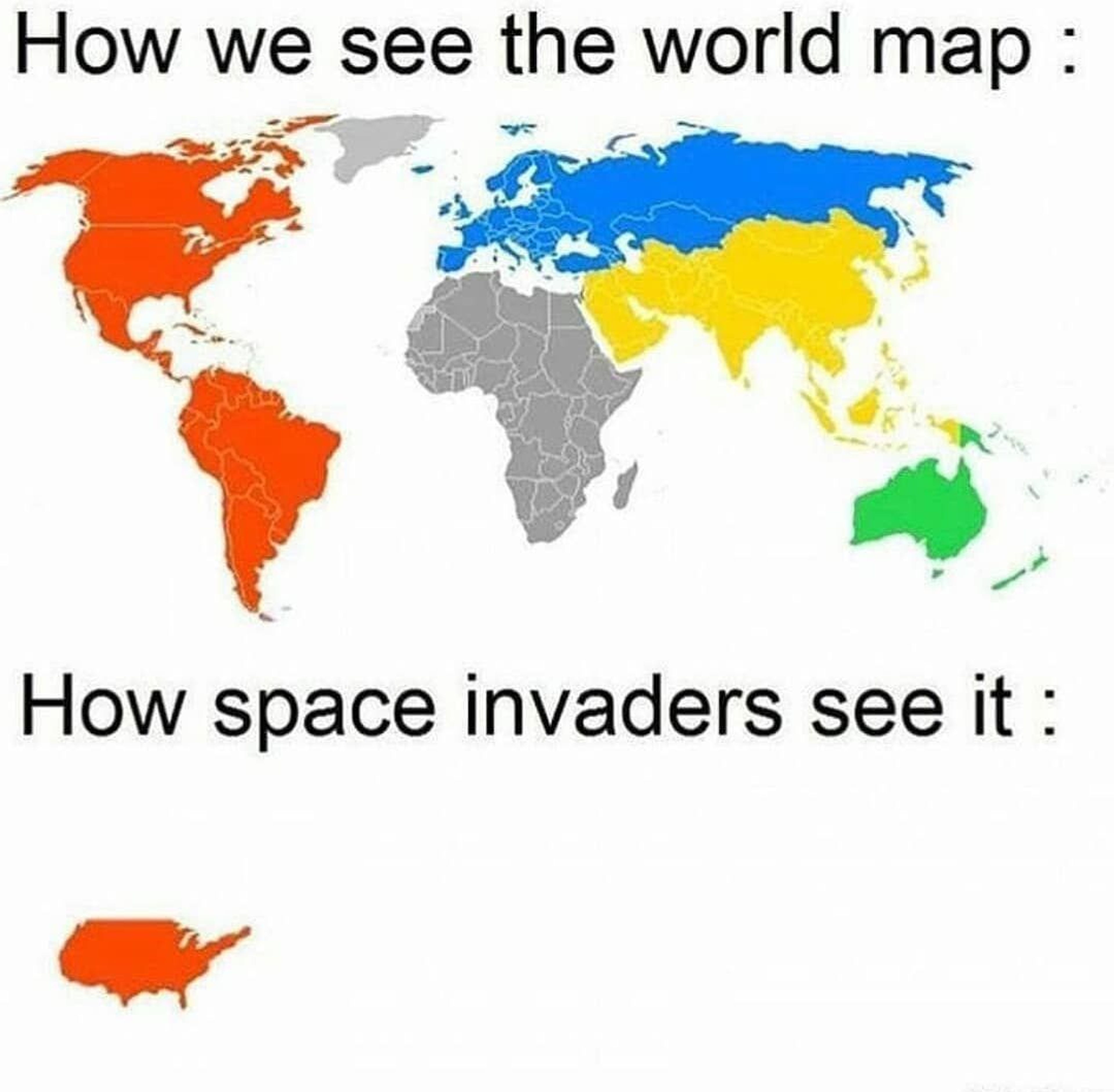
That is to say, only the US mattered to these programmers, and they happen to speak English. It wasn't long before we got ASCII (American Standard Code for Information Interchange) in 1963, a character set (charset) that assigned each character and symbol found in the English language a 7-bit number, commonly stored in a full 8-bit byte.
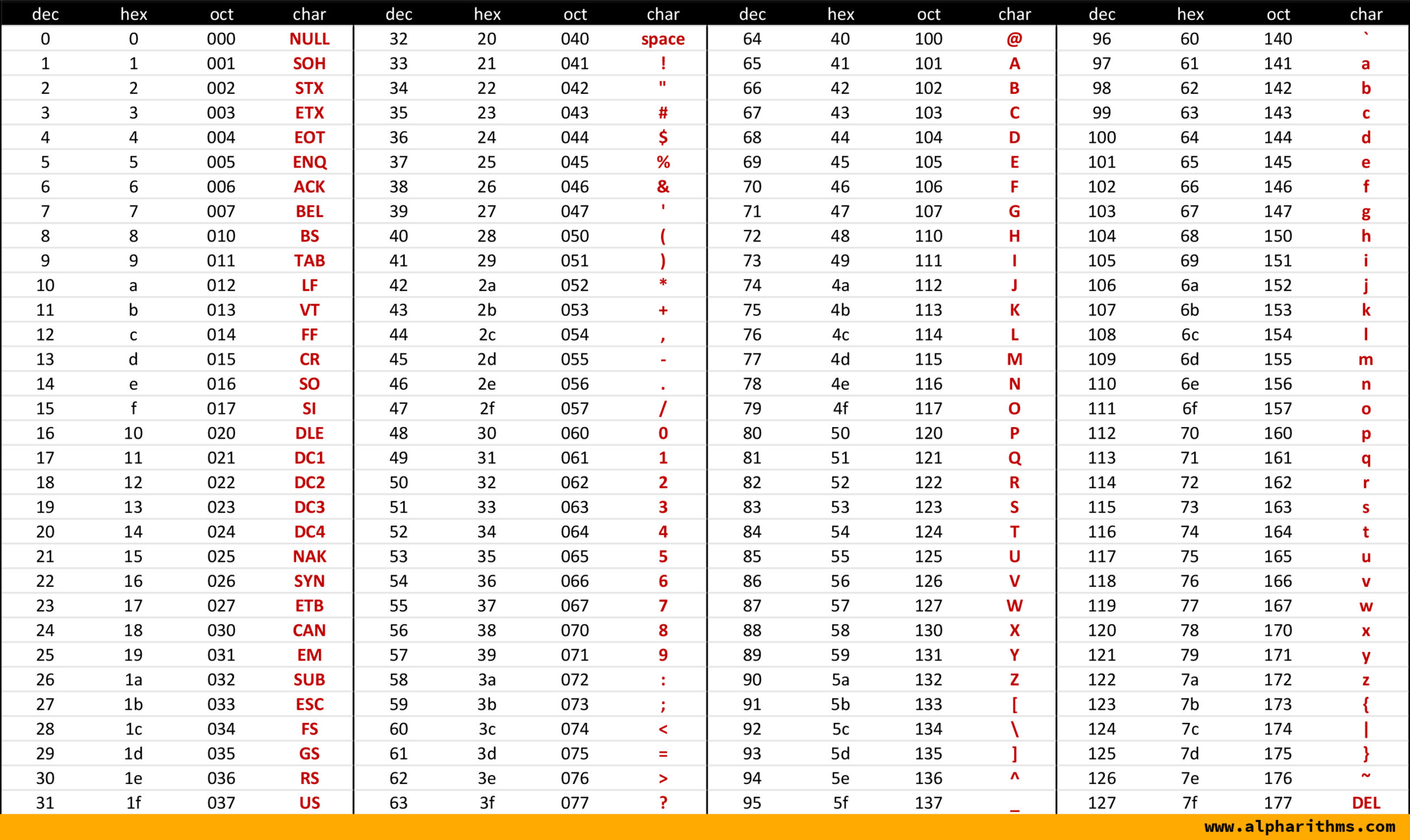
A = 65 = 0100 0001
? = 63 = 0011 1111
$ = 36 = 0010 0100
The standard was useful in allowing different computers to understand what each other are saying. It was also designed with some useful properties:
- Every character is a predictable length, 1 byte.
- We can easily count the number of characters in a string by just looking at the byte length of the string.
- We can find the 10th character (1 indexed) by jumping to the 9th byte (0 indexed).
- Visible and invisible characters are separated on the
32 = 0010 0000boundary. - We can convert from lowercase to uppercase by flipping a single bit.
A = 65 = 0100 0001a = 97 = 0110 0001
- Getting a decimal digit is as simple as adding its 4-bit binary representation to the stem
0011 XXXX.5 = 0101"5" = 0011 0000 + 0101 = 0011 0101
- Each character's numerical representation remains unchanged whether we use an unsigned or a signed 8-bit integer.
This is great!
Unless you don't speak English...
The Explosion of Single Byte Character Sets
Shortly after the aliens left, people decided pretty quickly that they wanted to communicate in languages other than English. Conveniently, ASCII only used 7 bits of its 8-bit reservation, leaving a whopping 128 characters of free real estate. Over the following years, every man and his dog went ahead and created their own standard for what characters those remaining numbers represented. Every operating system, language and programmer with a bright idea had their own way of encoding the various characters.
What we were left with were single-byte character sets that helped encode languages like the following:
- Cyrillic: АаБбВвГгДдЕеЁёЖжЗзИиЙйКкЛлМмНнОоПпРрСсТтУуФфХхЦцЧчШшЩщЪъЫыЬьЭэЮюЯя
- Greek: ΑΒΓΔΕΖΗΘΙΚΛΜΝΞΟΠΡΣΤΥΦΧΨΩαβγδεζηθικλμνξοπρςστυφχψω
- French: ÀÂÄÆÇÈÉÊËÎÏÔŒÙÛÜàâäæçèéêëîïôœùûü
All these character sets extended upon ASCII, occupying the top half of our 8-bit allowance. They all got different names, and were all incompatible with each other:
- Windows-1252 (Western Europe)
- ISO 8859 Series (Western Europe again)
- Mac OS Roman (Western Europe one more time)
- Windows-1251 (Cyryllic)
- ISO 8859-11 (Thai)
- + hundreds more.
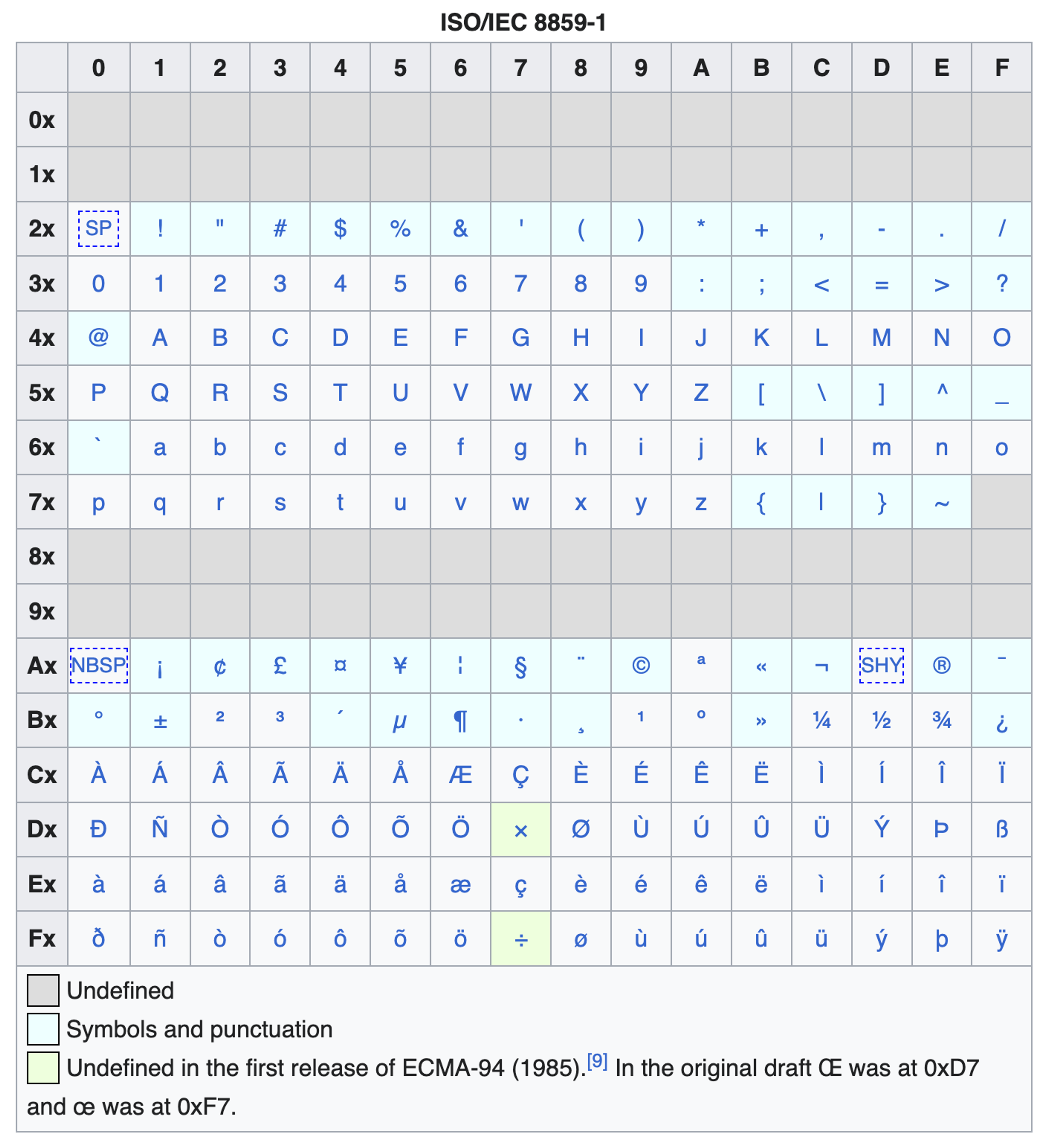
It's worth noting that many asian languages, notably Chinese, Japanese and Korean don't have single byte character sets, because there's simply too many characters in these languages.
Multi-Byte Character Sets
Given many Asian languages such as Chinese, Japanese and Korean have far more than 256 characters in their alphabets, the natural solution is to encode these languages with 2-byte encoding schemes instead of one. 2 bytes provides 65,536 available codepoints, which is plenty for a single language. As with single byte encodings, we also saw an explosion of multi-byte encodings, with many encodings for the same language (all incompatible of course):
- GB 2312, GBK, Big-5, GB 18030, CNS 11643... (Chinese)
- Shift-JIS, EUC-JP (Japanese)
- EUC-KR (Korean)
Unicode (UTF-8, UTF-16, UTF-32)
In 1987, engineers at Xerox and Apple sat down with a simple, ambitious goal: one encoding to replace the hundreds of conflicting single-byte charsets. The Unicode Consortium was officially formed in 1991, and the Unicode Standard has been expanding ever since. The idea was pretty simple:
Assign every character in every writing system a unique number. How you store those numbers on disk or wire is a separate problem.
That "separate problem" produced three encodings: UTF-32, UTF-16, and UTF-8. They all describe the same code points, just with different numbers of bytes. As of Unicode 17.0, the standard encodes 159,801 unique characters.
UTF stands for the Unicode Transformation Format
UTF-32 | Fixed Length Encoding
UTF-32 is the simplest conceptually. Every code point gets exactly 4 bytes, essentially making strings an array of 32-bit integers. This makes certain operations easy, want to jump to the 10th character? It starts on the 36th byte. The downside is obvious, every ASCII character now costs 4 bytes instead of 1, which is very wasteful considering the majority of text content exists entirely in ASCII. As a result, almost nobody uses UTF-32 for storage or transmission. It's more often found as an intermediate representation for processing and string manipulation.
"A"   in UTF-32  =>  00 00 00 41   (4 bytes)
"à"   in UTF-32  =>  00 00 00 E0   (4 bytes)
"💻"  in UTF-32  =>  00 01 F4 BB   (4 bytes)
UTF-8 | Variable Length Encoding
UTF-8 is variable-length, using 1-4 bytes per code point, and fully backwards-compatible with ASCII. The first 128 code points (U+0000–U+007F) store as a single byte identical to ASCII, meaning every ASCII document is already valid UTF-8.
The trick is a prefix system. The number of leading 1 bits in the first byte tells the decoder exactly how many bytes follow for that code point. Continuation bytes always start with 10, which means you can always detect if you've landed mid-character when seeking, the encoding is self-synchronising.
1 byte:  0xxxxxxx                             U+0000–U+007F    ASCII range
2 bytes: 110xxxxx 10xxxxxx                    U+0080–U+07FF    Latin, Greek, Cyrillic...
3 bytes: 1110xxxx 10xxxxxx 10xxxxxx           U+0800–U+FFFF    CJK, most symbols
4 bytes: 11110xxx 10xxxxxx 10xxxxxx 10xxxxxx  U+10000–U+10FFFF Emoji, rare scripts
For example:
"A"   =>  41             (1 byte,  U+0041)
"à"   =>  C3 A0          (2 bytes, U+00E0)
"💻"  =>  F0 9F 92 BB    (4 bytes, U+1F4BB)
UTF-16 | What we once thought of as "enough"
UTF-16 uses 2 bytes for most characters (the Basic Multilingual Plane, U+0000-U+FFFF) and 4 bytes for everything above that using surrogate pairs. It was designed when the consortium believed 65,536 characters would be enough to cover all languages and symbols. They were wrong.
Surrogate pairs use two reserved 2-byte code units, a high surrogate (U+D800-U+DBFF) followed by a low surrogate (U+DC00-U+DFFF) to encode a single code point above U+FFFF. This is exactly why JavaScript's .length returns 5 for our emoji.
"👨💻".length => 5
// 👨 = [U+1F468](https://unicode-explorer.com/c/1F468) => 👨 (high + low surrogate = 2 code units)
// ZWJ = [U+200D](https://unicode-explorer.com/c/200D) => (BMP, 1 code unit)
// 💻 = [U+1F4BB](https://unicode-explorer.com/c/1F4BB) => 💻 (high + low surrogate = 2 code units)
// Count code points safely in JS:
[..."👨💻"].length // => 3
Array.from("👨💻").length // => 3UTF-16 is largely a legacy hangover still present in many languages today. It is the internal encoding in JavaScript, Java, C#, and Windows (WCHAR). If a string length ever surprises you in those environments, check for surrogate pairs first.
Zero Width Joiner
The Zero Width Joiner (U+200D) is a code point that tells a renderer: "if you know a combined glyph for the characters on either side of me, use it." The technologist emoji is such a case:
1👨 + ZWJ + 💻 = 👨💻 man + joiner + laptop = man technologist
2[U+1F468](https://unicode-explorer.com/c/1F468) [U+200D](https://unicode-explorer.com/c/200D) [U+1F4BB](https://unicode-explorer.com/c/1F4BB)This is also why the same emoji can look different across platforms. The code points are identical, but each OS ships its own font and renderer that decides which ZWJ sequences it supports.
Unicode Normalisation
For legacy reasons, there are sometimes multiple ways to encode a single character in Unicode. For example é can be written as a combination of the letter e (U+0065) and the combining acute accent ´ (U+0301) or simply just é (U+00E9). For the sake of simplicity, there are two main ways to normalise Unicode strings:
- NFC (Composed): codepoints are combined where possible, resulting in a more space efficient encoding.
- NFD (Decomposed): codepoints are split into their various parts, making sorting easier.
It's worth knowing about normalisation so that you're not completely confused when seeing:
1"é" == "é" // falseMojibake
These overlapping definitions led to a funny phenomenon that still occurs from time-to-time today called Mojibake (meaning "character transformation" in Japanese). Mojibake occurs when a perfectly corruption-free file is displayed as complete garbage.
Windows-1252
1为什么�约定 HTTP �议接入
2通过��劫�的方�会带�一定的 CPU 消耗,并且��平�型公�的�务器数�增多,这�开销会带�很高的�本。所以采�框架和 Mesh Proxy 进行约定的方�进行接入。本文档介�了 HTTP(HTTP/1.1 & HTTP/2)的约定释义,并�供接入�考。
3��说明
4为了使用下���的约定,需�满足如下的���件:
5�务部署在 TCE。
6使用 load �引导�动应用。
7以上两点�障了 ByteMesh 的 proxy �以动�部署到容器内。
UTF-8
1为什么要约定 HTTP 协议接入
2通过流量劫持的方式会带来一定的 CPU 消耗,并且随着平台型公司的服务器数量增多,这种开销会带来很高的成本。所以采取框架和 Mesh Proxy 进行约定的方式进行接入。本文档介绍了 HTTP(HTTP/1.1 & HTTP/2)的约定释义,并提供接入参考。
3前提说明
4为了使用下面提及的约定,需要满足如下的前提条件:
5服务部署在 TCE。
6使用 load 来引导启动应用。
7以上两点保障了 ByteMesh 的 proxy 可以动态部署到容器内。
The underlying bytes are the same, but we must read a piece of text with the correct encoding.
Detecting Encoding
But how can we know what the right encoding for a piece of text is?
The short answer is we can't. The long answer is we can guess what the encoding is based on context and heuristics.
Context
For example, 99% of the web uses UTF-8 and this proportion is only increasing. Thus, with no other information, just the fact that we may be dealing with a modern web server gives us confidence that text is UTF-8 encoded.
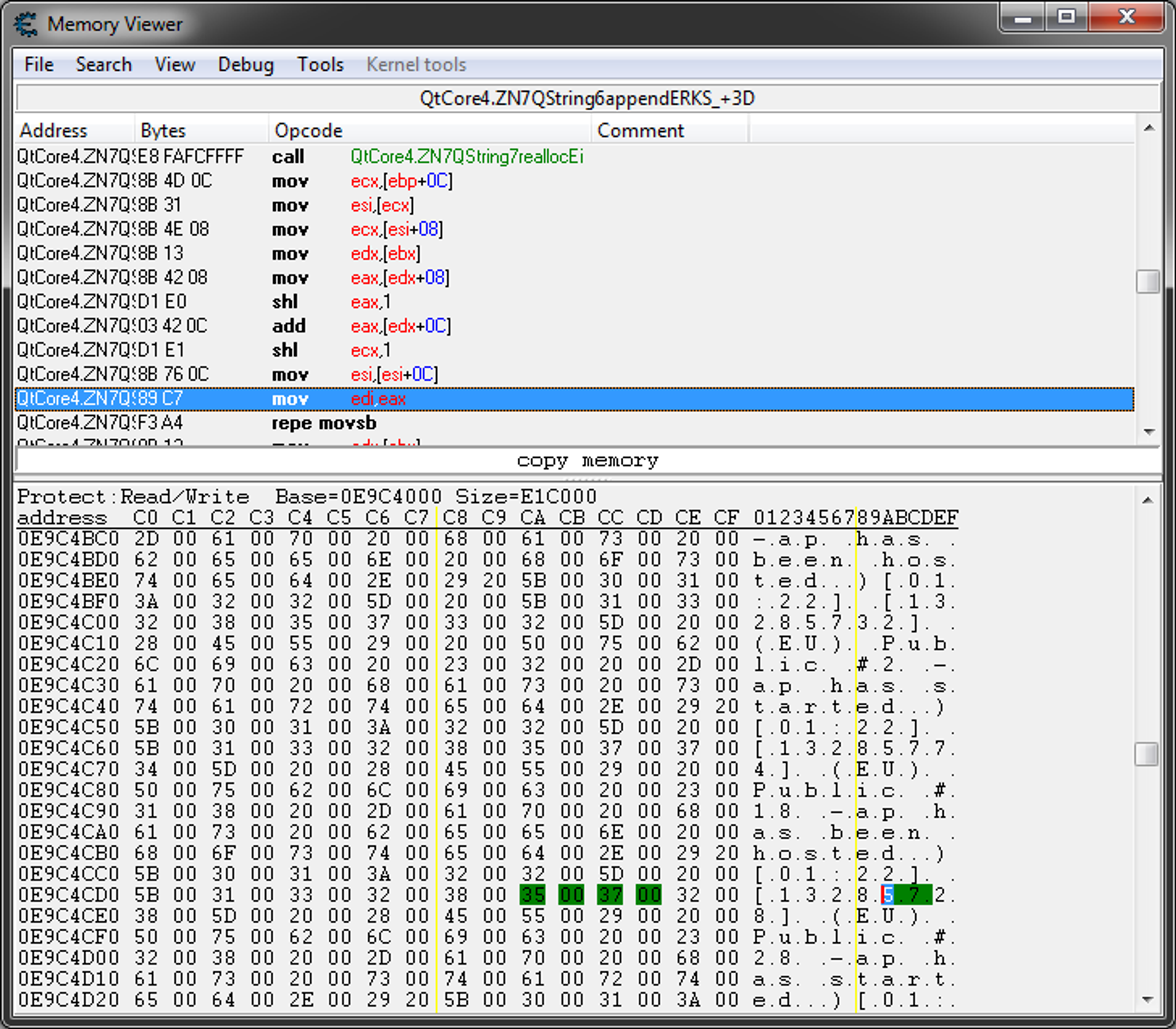
On Windows, UTF-16LE is the standard for in-process text; you'll know this is you've ever written C/C++ and related languages for the platform and have used the special wchar_t (wide character) type. This also explains why reading memory dumps from Windows systems often yields strings that look like this:
1Hex:  41 00 64 00 6D 00 69 00 6E 00
2Ascii: A . d . m . i . n .
Where the 00 bytes are represented as . in the string, meaning memory scans should search for strings in UTF-16LE, not just ASCII/UTF-8.
Charset Heuristics
We can also use various heuristics tables to determine the likely encoding of a piece of text.
- UTF-16 often has evenly spaced
00bytes. - UTF-8 follows strict rules with regard to multi-byte characters.
- Given different languages use different characters with distinctive frequencies, we can match known encoding histogram shapes to our text to determine its encoding.
- Byte-Order Marks (BOM):
FE FFin Big-Endian andFF FEin Little-Endian are placed at the beginning of the string to represent endianness in UTF-16 and UTF-32.- Excel requires BOMs to detect UTF-8 encoding when opening CSV files. This is despite the fact that UTF-8 does not have endianness, meaning there's no such thing as byte-ordering.
- BOMs can also be incorrectly read as data instead of stripping them by many programs that aren't aware of their existence.
- HTML pages can specify their charset using a
<meta charset="">tag in the start of the head. While this tag exists in the file, thus we can't know the encoding before reading, the beginning of every HTML starts with standard metadata that all exists within the ASCII codepoint range. This means that we can safely use any encoding to read up to thecharsettag, then re-read the page once we've determined its encoding. For this reason, not only is it highly recommended thatcharsettag be the first tag in the document, the HTML spec requires it to be within the first 1024 bytes.
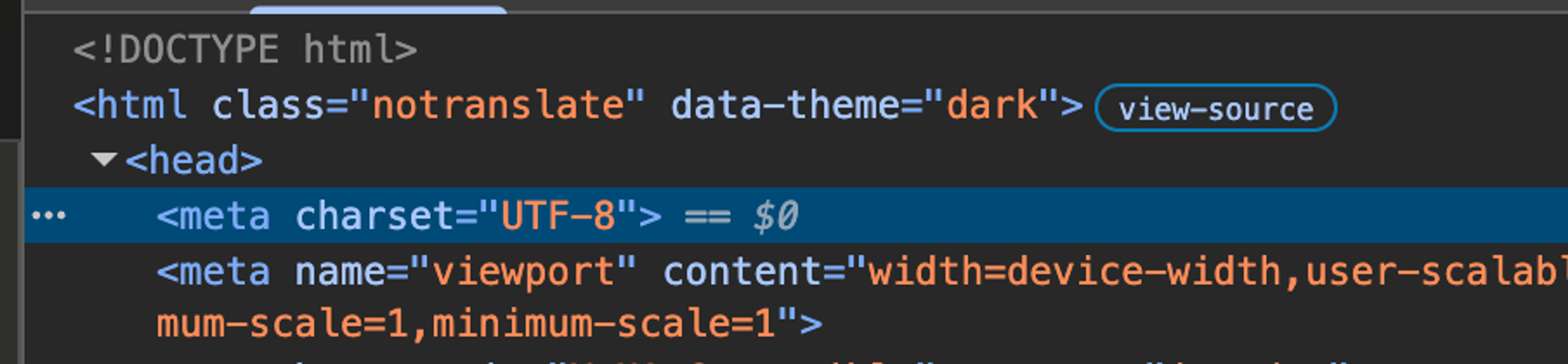
A combination of these techniques can give us a good guess as to the encoding of the string, but this is not a stable technique. Simply changing some innocuous characters can lead to the text being entirely re-interpreted.
Collations
Collations are a set of rules that tell us how we compare characters within a charset.
- Are the characters
aandbequal? - Should
acome beforeborbbeforea?
The most common place to run into collations is databases. For MySQL 8.0+ users utf8mb4_0900_ai_ci may be a common sight, but what does it mean? utf8mb4_0900_ai_ci actually specifies the both encoding and the collation.
utf8UTF-8mb4Multi-byte 4 (originally MySQL's UTF-8 only supported 3 bytes)0900Unicode Sorting Algorithm (UCA) 9.0aiAccent InsensitiveciCase Insensitive
There are a number of suffixes that tell us quick facts about equality in a given collation:
ciCase InsensitivecsCase SensitiveaiAccent InsensitiveasAccent SensitiveksKana Sensitive (Japanese)binBinary (equivalent tocs_asin most cases)
For example, a case insensitive (ci)collation would treat a as equivalent to A, meaning that a query of WHERE user.name = "john" could match john, JOHN or even jOhN. This is generally quite useful behaviour for searching user facing strings, but special attention should be paid when storing IDs, tokens, hashes etc. In this case c3RhdGVzdW4= and C3RhdGVzdW4= are not equivalent, and shouldn't be treated as equivalent meaning binary collation would be more suitable.
An accent insensitive (ai) collation works similarly, the following accented letters would all be equivalent; e,é, è, ê, ë and so on. This is great when you want to search for that new café but the closest thing you can manage to type on your keyboard is cafe.
Finally, you can also combine ai and ci to produce a very normalised (and unicode aware) collation such as utf8mb4_0900_ai_ci.
Many ByteDance assets still use the legacy utf8mb4_general_ci collation. This collation is unicode aware, accent-insensitive and case insensitive, but it is less accurate than utf8mb4_0900_ai_ci. utf8mb4_0900_ai_ci is now the MySQL default.
Collations for Sorting
While utf8mb4_0900_ai_ci is a catch-all collation for most internationalised content, it doesn't account for all cases. For example, Chinese characters and Japanese Kanji share unicode code points for the same characters. However, they are often pronounced and sometimes even written differently depending on which language is being spoken. As such, the rules for sorting these characters in Chinese differ from those used to sort these characters in Japanese, giving rise to language specific collations; utf8mb4_zh_0900_ai_ci and utf8mb4_ja_0900_ai_ci respectively.
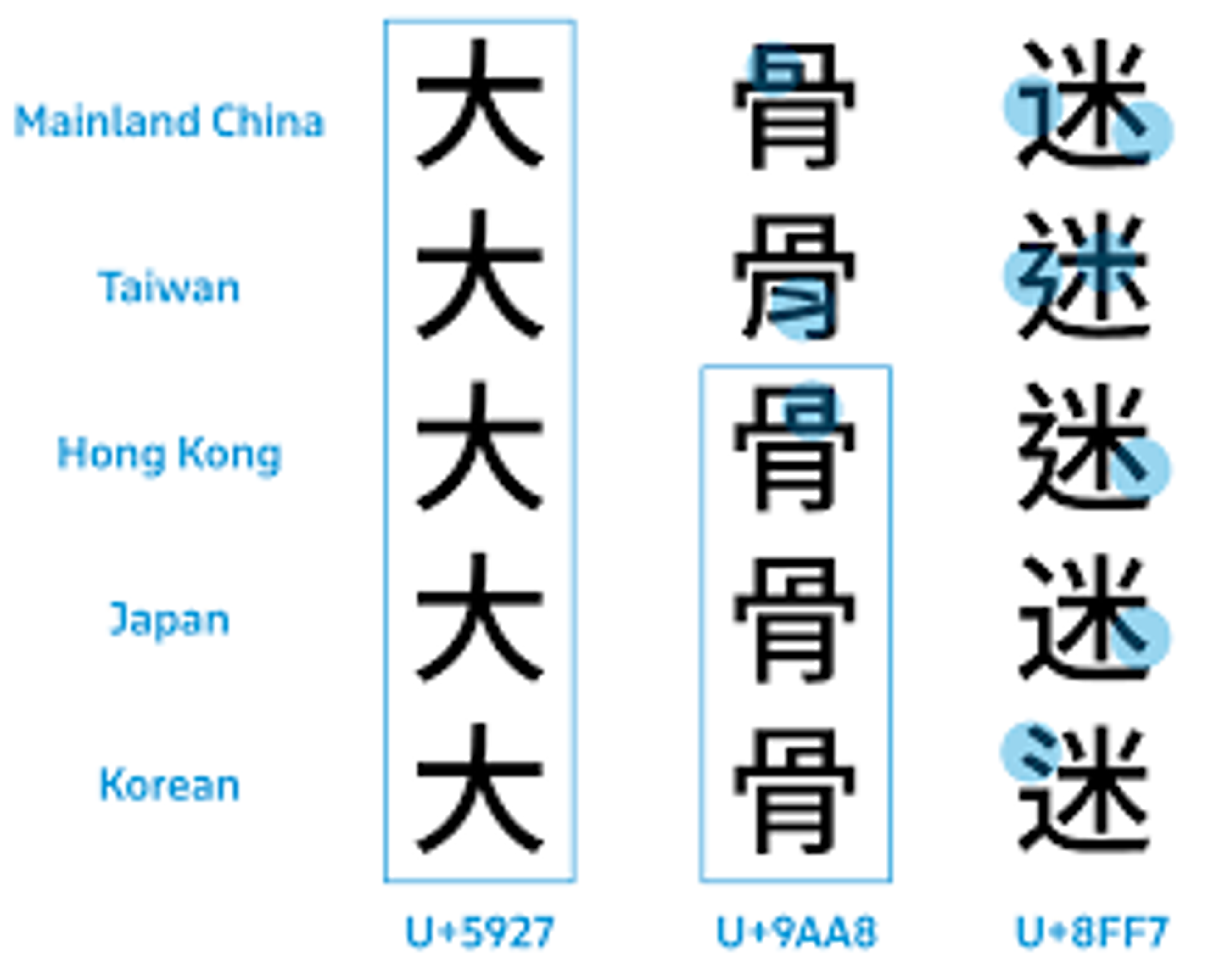
Applying Collations
While implementation and usage varies across databases, in general we can apply collations to 3 levels:
- Column
- Table
- Database
1CREATE DATABASE test CHARACTER SET utf8mb4 COLLATE utf8mb4_0900_ai_ci;We may also apply collations to the server, client, connection and query, however these use-cases are infrequent and alter how data is processed, rather than stored at rest.
1CREATE TABLE user_tokens (
2    id BIGINT UNSIGNED NOT NULL AUTO_INCREMENT,
3    user_id BIGINT UNSIGNED NOT NULL,
4    token VARCHAR(255) CHARACTER SET utf8mb4 COLLATE [utf8mb4_0900_bin](https://dev.mysql.com/doc/refman/8.4/en/charset-unicode-sets.html) NOT NULL,
5    expires_at TIMESTAMP NOT NULL,
6    PRIMARY KEY (id),
7    UNIQUE KEY uniq_token (token)  -- Case-sensitive uniqueness
8) ENGINE=InnoDB DEFAULT CHARSET=utf8mb4 COLLATE=[utf8mb4_0900_bin](https://dev.mysql.com/doc/refman/8.4/en/charset-unicode-sets.html);
Here we set the token column collation to binary, and the table default collation to binary such that the token column and any new columns created in this table will use binary collation.
Misconception: while it's easy to think of collations as the same as normalising our data before inserting it, these are fundamentally different techniques. If we use utf8mb4_0900_ai_ci the word Café would still be stored as Café in the database. However, it would appear as cafe in the index. When we query for CAFÉ, it is first normalised to cafe then compared against our index for cafe. The query would return the originally inserted text, Café.
Without an index, all this normalisation of both the query and each row would occur at runtime - very slow, another reason to index columns we search or sort on!
Strings & Characters in High-Level Languages
What is a Character?
Programming languages have defined and undefined behaviours. In general, it's useful to be certain about how strings will behave in a given language, so they're often formally defined. The issue is that strings are made of characters and there's no single way to describe what a character is, are they a...
- Byte?
- Code Point?
- Character?
- Grapheme? (what we perceive as a single character)
Implementations
In the vast majority of languages, strings exist as their own type, or even a primitive type. Those languages who don't consider strings to be a first-class type just refer to them as an array of bytes:
- C -
char[]orchar* - Zig -
[]const u8
Nowadays, UTF-8 is the de-facto standard, and modern languages reflect this reality. However, a lot of languages still in use today predate Unicode. Thus the definition of a "Character" varies:
- C/C++/Zig
charis 1 byte. - In JavaScript a character is a 2-byte string.
- In Go a
runeis 4 bytes. - In Python, a character is a single unicode point as a string.
- In Swift, a
Characteris variable length, with no limit.
In a lot of languages, where a character type isn't explicitly defined, taking the length of a complex emoji string will often tell you about that particular language models strings. Using the technologist again:
C: strlen("👨💻") => 11 (Bytes, assuming UTF-8)
JavaScript: "👨💻".length => 5 (Byte-pairs)
Python: len("👨💻") => 3 (Unicode Codepoints)
Go: utf8.RuneCountInString("👨💻") => 3 (Unicode Codepoints)
Swift: "👨💻".count => 1 (Graphemes)In general, we need to think about what we actually want to do when slicing and dicing a string. Do we want to modify a:
- A byte?
- A byte pair?
- A code point?
- A grapheme?
Depending on the answer to this question and the language you're using (sometimes even the OS too), the code you write could be quite different. Oftentimes, languages or libraries expose different methods to help manipulate strings on the desired level of abstraction.
How long is a piece of string?
We really don't know. That depends on its encoding, normalisation and how you define a "character".
Takeaways
If you remember nothing more than "strings are surprisingly complicated", please take away these 4 practical points for your daily work.
- Unless you know a string's encoding, we can't reliably make assumptions about the content, length or composition of that string.
- UTF-8 should be your default. Use it until there's a very good reason not to.
- Know your language! How does your language model strings in memory and expose these properties through its APIs?
- The right charset and collation can make sorting and comparisons effortless; the wrong one can seriously hurt user experience or introduce very subtle bugs and vulnerabilities.
utf8mb4_0900_binUTF-8, exact byte-level comparisons. Appropriate for IDs, Tokens, Hashes etc.utf8mb4_0900_ai_ciUTF-8, accent-insensitive, case-insensitive and more performant version of the full Unicode collation albeit without language-aware sorting. Useful for user input or user facing strings.
Further Reading & References
- (Generic) https://www.joelonsoftware.com/2003/10/08/the-absolute-minimum-every-software-developer-absolutely-positively-must-know-about-unicode-and-character-sets-no-excuses/
- (Go) https://go.dev/blog/strings
- (JS/TS) https://www.honeybadger.io/blog/encode-javascript/
- (MySQL) https://dev.mysql.com/doc/refman/8.4/en/charset.html
- (Swift) https://docs.swift.org/swift-book/documentation/the-swift-programming-language/stringsandcharacters/#Unicode
